Thursday, March 28, 2019

Grand Theft Auto Vice City Game Ko Android Phone Me Kaise Download & Install Kare?


Hello Dosto, Advik Gamer Me Aap Sabhi Ka Sawagat Hai And Mera Name Shiva Pal Hai Or Dosto Jabse Maine ek video dali thi how to hack Mini Militia yani Mini Militia game ko kaise hack karte hai Jabse Mujhe Lagatar  Comment  Aa Rahi Thi ki Grand Theft Auto Vice City Ko Apne Android Phone Me Kaise install Kare Bilkul Free Me to Dosto Maine Socha Ki is Topic Par bhi ek post Likhu Or Dosto Post He Nahi Maine is Topic Par Video Bhi Bana Chuka hu To agar aap post padhna nahi chahte hai to Aap us video ko dekh sakte ho dosto video ka link aapko is post ke end me mil jayega so aap waha se click karke us video ko dekh sakte ho to Dosto Aaj is Post me mai aapko yahi batane wala hu ki GTA Vice City Ko Apne Android Phone Me Kaise Download and Install Karte Hai Bilkul Free Me.

Dosto Jaisa Ki aap jante hai agar aap Grand Theft Auto Vice City ko playstore se install karte hai to aapko 156 rs dena padta hai or agar aap kisi Free app Store Jaise BlackMart Alpha Ya ac Market Ya Apptroid se install karte hai or install karne ke bad aap jab ise open karte hai to aapko kuch is trah ka error dekhne ke liye milta hai.


dosto aapko ye kyu dekhne ke liye milta hai ye bhi mai aapko is post me bata deta hu dekhiye jo ye free app store hote hai wo sirf aapko us app ka apk file provide karte hai uska obb data provide nahi karte hai or jab aap us particular app ko open karte ho to wo obb data ko access nahi kar pati hai jiski wajha se wo error aapko dekhne ke liye milta hai or dosto kuch website thi aisi jo aapko real me gta vice city ki download link provide karti thi or gta vice city ka he nahi or bhi bahut sare game ka free download link deti thi for example ke liye Play.mob.org ko he le lijiye par dosto ab is website par case chal raha hai so iske jitne bhi free download link the wo sabhi remove kardiye gye hai or unki jagha ab sirf palystore se download karne ka option aata hai par dosto aapko tention lene ki koi jarurat nahi hai kyuki is post me mai aapko jo download link dene wala hu wo google drive ki hoge or google drive se download karna bilkul easy bhi hai or aapko koi bhi ads dekhne ke liye nahi melege to dosto chaliye sikhte hai  GTA Vice City Ko Apne Android Phone Me Kaise Donload and Install Karte Hai Bilkul Free Me.


Download Grand Theft Auto Vice City For Android

Grand Theft Auto Vice City Apk Download

Follow the simple steps to get Downloading link


Grand Theft Auto Vice City obb Data Download

Follow the simple steps to get Downloading link


Es File Explorer  - Download


Grand Theft Auto Vice City Ko Apne Android Phone Me Kaise install Kare Free Me

Step 1:------

First To All Aap uper diye gye link se Grand Theft Auto Vice City Apk + OBB Data and es File Explorer ko Apne Android Phone Me Download Kare Download Karne ke bad aap sabse pahle apne Android phone me es File Explore Or GTA Vice City apk File ko install kare.


Step 2:------

Dosto GTA Vice City ka apk file or es File Explore ko install karne ke bad aap Simple es File Explorer ko open kare uske bad aapne jaha par GTA Vice City ka obb data download kiya tha waha par Jaye uske bad aap GTA Vice City ke obb data ke uper kuch time tak press kare or jaise he aap GTA Vice City ke obb data ke uper press karege to aapko ek More ka option dikhai dega jaisa ki aap abhi is ScreenShot me dekh sakte hai to aapko Simple us more ke option par click karna hai.


Step 3:------

Ab Aapko ek Extract To Ka option dikhai dega to aap Simple Extract To ke option par click kare.


Step 4:------

Ab Aapko Chose Path>>Sd Card  Par Click Karna Hai 3rd Wale option Par.


Step 5:------

Uske Bad aapko Apni Phone Ki Storage Select karni hai yad rahe aap external SD Card Select na kare aapko apne phone ki storage select karni hai.


Step 6:------

Ab Aapko Yaha Par ek Android Name Ka Folder Dikhai Dega To aap Simple Us Par click Kare.


Step 7:------

Uske bad aapko ek obb name ka folder show hoga to aap Simple us par click kare or OK ke Button par Click Kare.


Dosto Ab GTA Vice City ka obb data Decompress Hona Suru Ho Jayega to aap simple thoda wait kare.


To Dosto Ab aapka GTA Vice City ka obb data Decompress ho chuka hai to aap simple Back Aajaye or GTA Vice City ko Open Kare or Jaise he aap GTA Vice City Ko Open Karege to aapke phone me GTA Vice City successfully Run Karega. 

Dosto Agar Aapko is Post Se Samjh Nahi Aaya hai To aap niche wali meri video dekh sakte ho or sikh sakte ho or agar aapko fir bhi kahi par koi dikkat a rahi hai to aap simple niche comment karke puch sakte ho to dosto agar aapko ye post achha laga ho to aap hume niche comment box me comment karke jarur bataye mai milta hu aapse next post me jai Hind Vande Matram.

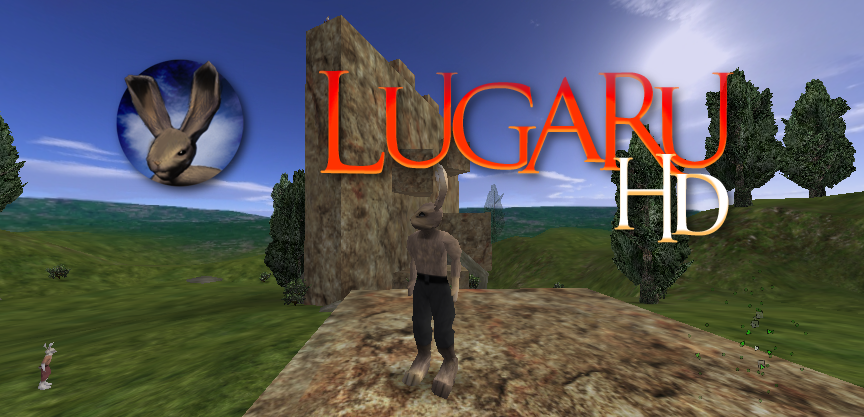
Fully Open Source 3D Killer Rabbit | Lugaru HD 1.1

Lugaru HD, aka OSS Lugaru, is now fully freely licensed. November 30th, 2016, the license was changed to state that all Wolfire assets are CC-BY-SA 3.0 licensed.

Two weeks later, version 1.1 was released. My favorite change: modern screen resolutions (e.g. 1080p) are now supported!

1.1 Highlights
- Multiple campaigns support, making it easier to install and play mods!
- These Lugaru mods are included by default as alternative to the Turner official campaign:
-- Temple, by Silb
-- Empire, by Jendraz
-- The Seven Tasks, by Philtron R. (albeit with some engine-related issues)
- All assets (animations, textures, models, maps, sounds, etc.) of Lugaru HD by Wolfire are under a free and open source license (CC-BY-SA 3.0)!
- Window and input management ported from SDL 1.2 to SDL 2.0, improving the support for modern screen resolutions and fullscreen mode, as well as better input handling.

The bunny melee fighting game is hard to learn but once you figure out the controls, you can sear through the missions rather quickly. Just don't play on anything but easy as a first-time player!

Lugaru is a fast-paced meele fighting and 3d platforming action game developed by Wolfire, the company that brought us Humble Bundle and perfectioned open development.

Linux, macOS and Windows versions (an source code of course) are available for download.

Wednesday, March 27, 2019

Supplement Your Earnings With Rewarded Products

Posted by Patrick Davis, Product Manager, Google Play

Developers are increasingly using multiple methods to monetize their apps and games. One trend has been to reward users for a monetizable action, like watching a video, with in-game currency or other benefits. This gives users more choice in how they experience the app or game, and has been an effective way to monetize non-paying users.

To support this monetization method, Google Play is excited to announce rewarded products, a new product type now available in open beta in the Play Console.

Rewarded products make it easy for Google Play developers to increase their monetized user base. Our first rewarded product offering will be in a video format. Users can elect to watch a video advertisement and upon completion be rewarded with virtual goods or in-game currency. In the example below, the user selects "watch ad", views the video, and then is granted 100 coins.

Rewarded products can be added to any app using the Google Play Billing Library or AIDL interface with only a few additional API calls. No extra SDK integration is required. This significantly reduces the work required to implement compared to other offerings. Rewarded products are powered by AdMob technology to give access to the broad range of content from advertisers currently working with Google.

Get started with rewarded products.

For developers interested in best practices on how to diversify revenue and how rewarded products fit in, please visit us at Google's Mobile Developer day at GDC or watch via the livestream.

How useful did you find this blog post?

Tuesday, March 26, 2019

SPSP 2015: Actually Predicting The Future

In regression (a common statistical practice used in social science research) we often attempt to predict the outcome of a given dependent measure (the DV) based on what we know about other measured variables theoretically related to the DV (the IVs). This common regression method has one problem though: We are predicting values for data that we have already collected. What if we were to engage in actual prediction? That is, what if we attempted to predict the values of a DV that is unknown? How might we do this and what would be the benefit?

This was a fascinating talk presented by Liz Page-Gould of the University of Toronto at the Future of Social Psychology Symposium!

Read More->

Kubuntu Desktop

FreeBSD fails me

Hose my computer while trying to update my OS once, shame on me.

Hose my computer while trying to update my OS twice, shame on my OS.

Last night I tried to update my "ports" (basically all the non-core software) on my FreeBSD system. There are three different programs to do this: portupgrade, portmanager, and portmaster. AFAICT they all do the same thing, so I chose the one that was installed: portupgrade.

Unfortunately, the process isn't completely automatic. There is this file called UPDATING in the ports tree which contains a list of things that have changed which require manual intervention. It appears that several things get added to the list every week. Ugh. But after whittling it down, I concluded that the only thing I really needed to do was follow some instructions to remove KDE, because the KDE port had been updated to a new release and some things changed in incompatible ways.

Fine, whatever. I did as instructed. But then when I tried to run portupgrade, it started complaining about ports being in an inconsistent state because the KDE libs had been removed. It directed me to run some pkgdb, which started asking me obscure questions for which there didn't appear to be any right answer. After struggling with that for a bit, I canceled it and went back to portupgrade, this time passing a flag which it had suggested I use if I wanted to skip verification of port states. It started installing, so I let it stew for awhile, and when I came back, my FreeBSD install was thoroughly broken.

I don't have time for this crap. It was fun while it lasted, FreeBSD, but it's time to find something a little lower-maintenance.

Let's try Kubuntu

I hear Ubuntu is popular, and it even has a specialized KDE-based version called Kubuntu. I decided to give it a try instead. Let's catalog the problems I run into and see how they compare to installing FreeBSD.

Can only prepare USB installer from Windows or Linux

My spare machine is a MacBook. When installing FreeBSD, I was able to download an installer image explicitly designed for a USB stick. Kubuntu can be installed from USB, but the images provided on the web site are strictly CD images. You can convert these into USB images, but it seems the only tools available to do this run on Windows and Linux, not OSX or FreeBSD. After struggling a bit I rebooted my MacBook into Windows.

syslinux hangs

Once I had the USB stick prepared, I tried to boot from it. Failure. All it did was print the version of syslinux it was using and then hang. "syslinux" is apparently a utility for producing bootable USB sticks based on Linux.

I really had no idea what to do about this, and a Google search didn't produce any hints. On a lark I tried downloading syslinux on my Windows machine and then running it to re-initialize the USB stick. I noticed that the version the Kubuntu installer had chosen to use was 3.86, whereas 4.03 is now available. The package contained an executable called "syslinux.exe". Not knowing what else to do, I ran it on the command line. It informed me of a bunch of options, none of which made any particular sense to me.

I tried "syslinux g:" to initialize the G drive. Nothing appeared to happen. But just in case, I then tried booting from it and, miraculously, it worked! Wow. Did not expect.

Installer fails

Unfortunately, immediately after choosing what to do from the bootloader menu, I was dumped to a shell with the error message: Can not mount /dev/loop1 on cow

Some Googling revealed that this happens if, when running the Ubuntu tool to prepare the USB stick, you choose the option to allocate some space to save temporary files on the stick. This is the only option the tool gives you, and it is enabled by default. Apparently it doesn't work. You have to disable this option. WTF?

OK fine. Re-did the USB stick and tried again. Hung at syslinux. Re-fixed syslinux and tried again. Finally, it works!

Whoa

I...

Whoa.

Holy polished OS, Batman. I mean, really. Wow.

Let's go through the problems I had on FreeBSD, and compare.

Installer

Once I got the USB stick correctly initialized, I have to say that the Kubuntu installer was the best OS installer I have ever used. The thing ran at native 2560x1600 resolution. It gave me the option to choose my keyboard layout (Dvorak) at the very first menu. The partition manager was simple and intuitive, and even gave me the option of using btrfs (though I held off for now since it seems it is not yet ready for prime-time). And the installer let me configure the system while it copied the files -- although there was very little configuration to do. The whole process took about ten minutes. It was better than the OSX installer. This was completely the opposite of FreeBSD.

Installing Packages

There's a beautiful GUI for this, and it's of course backed by apt. All packages are available in binary form and are updated regularly.

Graphics Driver

The included Nouveau driver immediately had me running at 2560x1600. Of course, it was a bit sluggish, so I set out to install the nVidia driver.

Kubuntu includes a GUI app for this. It fetches the driver for you, builds, and installs it, all with a nice progress bar.

Holy. Crap.

Graphical login

This was already working on first boot.

Audio

Here I have a minor problem. Audio works, but goes to both my headphones and speakers. Plugging in the headphones does not mute the speakers. This is not a big deal for me since I can separately turn off my speakers, but I was a little bit surprised to find that Linux did not seem to provide me any way to fix this. I actually found a GUI app for twiddling all kinds of things related to the HD Audio driver, but couldn't find any knob that would make it mute the speakers when the headphones were plugged in. AFAICT from the internets, this is a common problem, and the solution is usually to wait for the driver to be updated for your hardware.

Oh well. At least it does actually play to both the speakers and headphones by default, unlike FreeBSD which did not do anything with the headphones until I started poking at the boot configs.

Chrome

Well, obviously, I just installed the Google-provided package, which will now happily auto-update Chrome for me. No mucking around with source code here.

Flash

This worked out-of-the-box. Contrary to my experience on my work Linux machine, I have not seen any performance problems.

Fonts

A few fonts looked a little weird at first, until I installed the msttcorefonts package. Now everything looks good.

Suspend/Resume

The "sleep" option in the Kubuntu menu seems to work fine. The only odd part is that I have to press power to wake it -- keyboard keys are ignored. But I guess that's not a big deal.

iTunes replacement

Amarok is available, obviously. But after using it for awhile on FreeBSD, I have decided it is pretty much crap. The UI is weird and just does not do the things I want. I'll be on the lookout for something new, but this isn't really an OS issue.

ZFS

Linux does not have ZFS due to stupid licensing squabbles. ZFS is open source. Linux is open source. But the technicalities of the licenses do not allow them to be used together. Lame.

But I guess Linux now has BTRFS, which is similar. The Kubuntu installer actually gave me the option to use it, unlike the FreeBSD installer where I had to set up ZFS manually on the console. However, from what I've read, BTRFS is not quite ready yet, because it lacks an fsck-like tool. This apparently means that a BTRFS partition can be left unrecoverable after a power failure. It looks like this will be resolved Real Soon Now, but I decided to play it safe until then.

Eclipse

Eclipse officially supports Linux, of course. But the packages available from apt were for version 3.5, whereas 3.6 has been out for a few months now. So, I decided to install the official release instead of the apt package.

Boot-up Splash Screen

Kubuntu provides a very nice, minimalist splash screen by default, and it even runs at native resolution (which the FreeBSD one certainly didn't).

Wine

The default apt repositories did not include Wine 1.3, but there's apparently an alternate repository listed on the Wine site that does. Installed from there. Piece of cake.

Starcraft 2 installed and patched with no problems, following basically the same procedure as I did on FreeBSD, except without the part where I had to upgrade the kernel, or the part where the patcher kept crashing. The latter is probably due to the newer Wine version.

Conclusion

Well, I'm pretty much blown away. What took me two or more weekends to set up on FreeBSD took only two weeknights on Kubuntu. Of course, it's no real surprise that Kubuntu would be more usable than FreeBSD, but I honestly didn't expect this much polish. I could actually see non-technical users using this. Canonical has done an amazing job.

Game Music Online: 8-Bit Music Theory

One of the old series I definitely want to bring back is the "Game Music Online" series where I highlight cool things that are game audio related on the internet.  I tend to like quite specific, in-depth analysis and explanation.  But, I can also like a viral fun video too.  In this case, I'm going with something a bit of both, but probably more in the first category.

Over the summer, YouTube suggested to me a video from a channel called 8-bit Music Theory.  This channel has incredible videos that are beautifully made and that have clear explanations of the musical analysis.  They are artistic and pleasant to watch, with a clear voice over game play as well as examples in western notation.  These videos are really fantastic resources that explain these music theory applications in a straight-forward, engaging manner.  I really wish more educators knew about these videos as resources when teaching.  Not only could they work well in a music appreciation sense, but also they would be great for AP Music Theory classes.  They could even to give ideas for how a college level teacher might incorporate using video game music in the teaching of a particular concept.

The channel isn't even a year old and has already gotten an impressive collection of videos and followers.  Having made some videos to teach musical concepts, I can't imagine the amount of time that it takes to create just one of these videos!  I'm also quite interested in knowing more about whomever is creating these.  I didn't notice a name or link on the YouTube site about the creator.  With a light bit of digging, I only find that the creator is from Canada and goes by "8-bit."  I'd love to know more-- if you do, leave me a comment.

One of the first videos I saw on the channel, and also one of my favorites, is the video on Nonfunctional Harmony in Chrono Trigger.  Chrono is one of my favorite games and I love the discussion of harmony presented here.


I also particularly enjoyed the video on the compositional style of Mega Man II.


There's a series on the music in Breath of the Wild that I enjoyed too.  Here, I link to the last video of the series on the music of Hyrule Castle.  I've planned to highlight the music on Hyrule Castle in my own post on BotW.  What the video misses for me is discussion about why the instrumentation changes between the inside and outside make sense for the player and the information that conveys.  Thankfully, it gives me a point to write about, since the other aspects of the theme are handled so well.  

I look forward to seeing what comes from this channel in the future.  Check it out and subscribe if you find it worthwhile, as I do.  


Saturday, March 23, 2019

ouo.io - Make short links and earn the biggest money


Shrink and Share

Signup for an account in just 2 minutes. Once you've completed your registration just start creating short URLs and sharing the links with your family and friends.
You'll be paid for any views outside of your account.

Save you time and effort

ouo.io have a simple and convenient user interface, and a variety of utilities.
We also provides full mobile supports, you can even shorten the URL and view the stats on a mobile device.